Who benefits from this widget?
Your visitors come with different needs. This widget gives everyone controls that make browsing more comfortable, without changing your site's design.
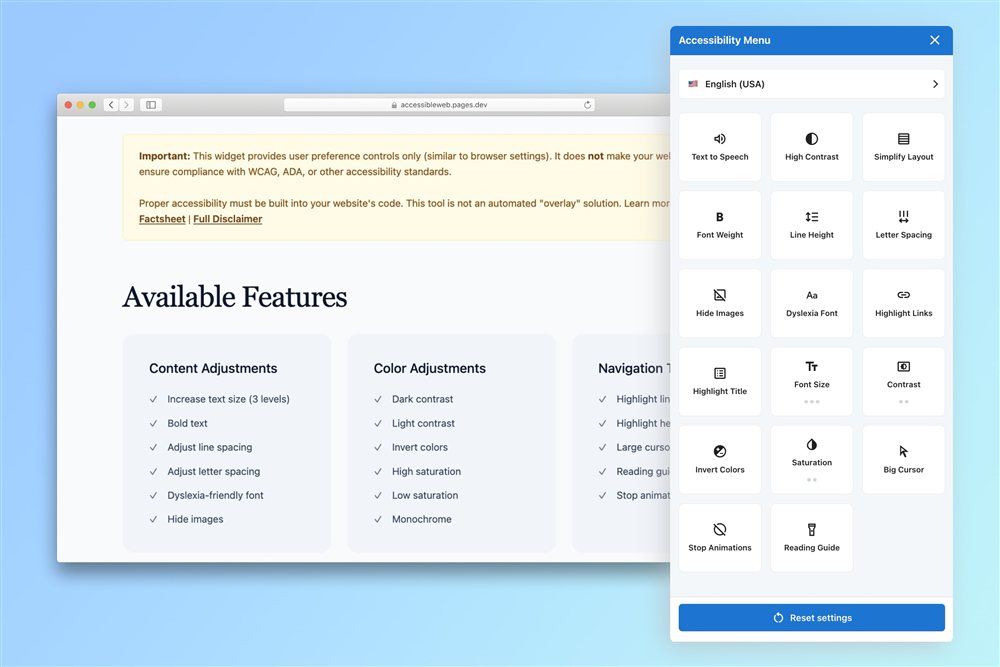
Users with low vision benefit from larger text, high contrast mode, and the ability to invert colors. The widget puts these controls right on the page, with no need to dig through browser settings.
The built-in text-to-speech feature lets users listen to page content without an external screen reader. Fully keyboard accessible, with proper ARIA labels throughout.
Saturation controls let users reduce or boost color intensity to make content easier to distinguish. High contrast mode provides a clear black-and-white experience for those who need it.
The reading guide helps users track their position on the page. Stopping animations reduces distraction. Wider line and letter spacing improves text flow for users with cognitive differences.
Users with photosensitive epilepsy or migraine can immediately stop all animations and transitions on the page with a single toggle, giving them control over potentially harmful visual motion.
The dyslexia-friendly font switch replaces the page font with a specially designed readable typeface that improves letter distinction and word spacing, making reading significantly easier.
Users who navigate without a mouse can highlight all links and headings on the page, making it easy to locate interactive elements and understand page structure at a glance.
Test the widget live
Click the buttons to change accessibility in real time.
Install in 30 seconds.
Works on any website.
No account. No signup. No configuration required. Just paste one script tag before the closing </body> tag and the widget appears automatically on your page.
Works on WordPress, Shopify, Squarespace, Wix, custom-built sites, or any platform that lets you add a script tag.
Zero tracking.
Zero cookies.
Zero compromise.
The ZEBRABYTE widget stores preferences only in the visitor's own browser localStorage. Nothing is ever sent to our servers or any third party.
No GDPR consent banner needed for the widget. No analytics. No telemetry. Just a tool that helps people, and nothing more.
How it works
Paste the script
Copy one line of HTML and paste it before </body> on your page.
Widget appears
A floating accessibility button appears on your page, fully styled and ready.
Visitors adjust
Users open the panel and select the preferences that work best for them.
Settings saved
Preferences are remembered locally, and the experience persists across visits.
Ready to make your site more accessible?
No account. No credit card. No hidden fees. Add the widget today and give your visitors the controls they deserve.
<script src="https://accesibilitate.zebrabyte.ro/dist/zbt.js" defer></script>
Accessibility Insights
Practical guides, cybersecurity threat analyses, and advice on executing WCAG compliance on your websites.